
August 24, 2013

Real estate gets messy fast. What starts as one rental property can turn into three LLCs, five bank accounts, two property managers, and a drawer full of receipts before you know it. Most investors handle the financial side the same way they handle everything else at the start — by cobbling together whatever tools are available. QuickBooks for the accounting. Excel for the tracking. A bookkeeper to hold it all together.
It works. Until it doesn't.
The right accounting software for real estate investors isn't just a tool that tracks income and expenses. It's one that understands how real estate actually works — multiple entities, property-by-property reporting, Schedule E line items, bank connections that don't break. This guide breaks down what to look for, why generic tools fall short, and how to match the right software to where you are in your investing journey.
QuickBooks is the most widely used small-business accounting software in the US — more than 6.5 million businesses rely on it, and many of those are real estate investors. For a single-entity business with predictable revenue and expenses, it works well. But real estate investing doesn't often look like a single-entity business. It’s more likely five LLCs with separate bank accounts, each holding different properties, each needing its own set of books — all of which you need to see in one place.
That's where QuickBooks breaks down. QuickBooks Online requires a separate subscription for each company file. Three LLCs means three subscriptions. Five LLCs means five subscriptions. At the Plus tier — the plan most small investors need — that's $115 per month, per entity. Five entities puts you at $575 a month before you've paid a bookkeeper or opened a spreadsheet.
The other problem is setup. QuickBooks can be configured for real estate, but the keyword is 'configured.' You need to manually create a chart of accounts that matches real estate categories. You need to set up classes or locations for property-level tracking. You have to add integrations to generate anything resembling a Schedule E report. It's not impossible — plenty of investors do it — but the time and expertise required is real, and every time you add an entity, you start the process over.
A real estate investor managing 10 properties across 5 LLCs using QuickBooks Plus could pay $575/month just in software subscriptions — before bookkeeping, integrations, or accountant fees.
The broader point: QuickBooks is a general-purpose accounting tool adapted for real estate. The adaptation takes effort, expertise, and ongoing maintenance. And it still doesn't give you a consolidated view across entities without significant manual work.
Purpose-built accounting software for real estate investors starts with the assumption that you own multiple properties, probably across multiple entities, and that your primary reporting needs are property-level and Schedule E-ready. Not the generic profit-and-loss statements that work fine for a small business.
Here's what that looks like in practice:
According to research from SoftLedger cited by Invensis, around 45% of CFOs prefer accounting software that features multi-entity consolidation. For real estate investors managing multiple LLCs, this isn't a nice-to-have — it's the feature everything else depends on.
The investor with three properties in one LLC has different needs than the investor with 15 properties across six entities. But both need software that understands the language of real estate: rent, NOI, Schedule E, depreciation, entity, property manager. Generic accounting tools speak the language of invoices and accounts payable. That translation gap costs time every single month.
Most real estate investors structure their portfolios using LLCs for liability protection and tax efficiency. According to the Congressional Research Service's analysis of the Rental Housing Finance Survey, LLPs, LPs, and LLCs owned 15.4% of all US rental properties as of 2020 — and 40.4% of all rental units. That number has grown steadily since 2001, driven largely by individual investors using LLCs as protective structures for their personal portfolios.
Each LLC is a separate legal entity. It typically needs its own bank account to maintain the separation that makes it legally effective. It may need its own tax return, depending on how it's structured. And every transaction flowing through it needs to be categorized in a way that produces accurate financials at both the entity level and the property level.
When you have one LLC, this is manageable. When you have five or ten, it's a full-time job unless your software is built to handle it.
The Real Estate CPA's bookkeeping guide for investors puts it plainly: “More advanced investors often hold properties across multiple LLCs, syndications, or partnerships. Keeping equity contributions, inter-company transfers, and tax compliance clean requires entity-level and portfolio-level visibility, something DIY systems can't handle well.”
This is the core problem. DIY systems — spreadsheets, QuickBooks configured by hand, Stessa for a single-property investor — weren't designed for the complexity that comes with a real portfolio. They work until they don't. And when they stop working, the cost isn't just time. It's the tax deductions you missed, the billing errors your property manager wasn't caught making, and the decision you made based on financials that weren't quite right.
The right accounting software doesn't just record what happened. It tells you what's happening across every entity, every property, and every bank account — right now.
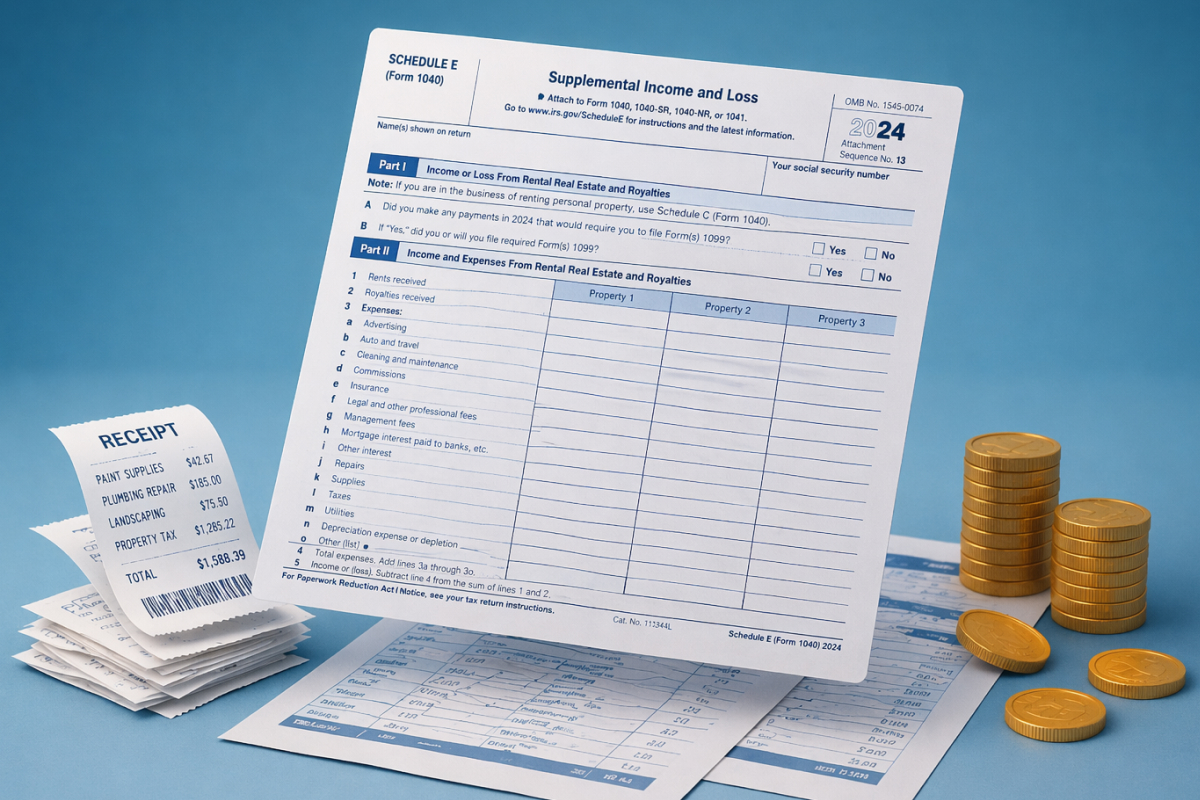
Schedule E is the IRS tax form used to report rental income and expenses for investment properties. As of 2024, the IRS estimated roughly 9.72 million taxpayers own rental property — nearly all of them need to file a Schedule E each year.
The form is organized by property. For each rental property you own, you report gross rents received and then deduct allowable expenses across 15 defined categories: advertising, auto and travel, cleaning and maintenance, commissions, insurance, legal and professional fees, management fees, mortgage interest, other interest, repairs, supplies, taxes, utilities, depreciation, and other. If you own more than three properties, you file additional copies of Schedule E.
Here's where accounting software either saves you or costs you: every transaction you enter throughout the year needs to map to one of those categories. If your software uses a generic chart of accounts — 'operating expenses,' 'professional fees' — your CPA (or you) has to manually reclassify everything come tax time. That's the work that takes weekends. Software that maps transactions to Schedule E categories as you go means your year-end report generates in one click.
The IRS also requires property-specific reporting. You can't aggregate all your rental income and expenses into one line — each property gets its own column. Kestrel's one-click financial and tax reporting is built around this structure, generating property-level P&L statements that hand directly to your CPA without requiring a weekend of prep work.
For investors with multiple entities, the Schedule E picture is even more complex. A single-member LLC that owns a rental property files a Schedule E on the owner's personal return. A multi-member LLC files a separate partnership return and issues K-1s. Keeping this structure straight across multiple entities — and ensuring the right transactions appear on the right forms — requires either a skilled bookkeeper or software that understands the structure.
Not every investor has the same needs. Here's a straightforward way to think about the fit:
Early stage: 1–3 properties, one entity
At this stage, your priority is getting clean records in place from the start. Stessa offers a free tier and handles the basics well for a single-entity, small-portfolio investor. REI Hub is a solid paid option with strong Schedule E support. QuickBooks works if you're willing to configure it — or if your bookkeeper already knows it. You could even use a simple spreadsheet to track everything if you keep it updated and accurate.
The main risk at this stage isn't the tool. It's the habit. Investors who let transactions pile up unreconciled for months are building a problem they'll eventually pay a bookkeeper to fix. Whatever you use, connect your bank accounts and categorize transactions monthly.
Growth stage: 4–10 properties, 2–4 entities
This is where most generic tools start to show cracks. You're logging into multiple QuickBooks accounts to see the full picture. You're manually consolidating spreadsheets to understand your total NOI. Your bookkeeper is spending time reconciling instead of analyzing.
At this stage, you need software that consolidates across entities natively. You should be able to see your entire portfolio — every LLC, every property, every bank account — in one view, without exporting and stitching files together. This is the stage where the cost of the wrong tool shows up most clearly.
Portfolio stage: 10+ properties, 5+ entities
At this scale, the software isn't a nice-to-have — it's infrastructure. You likely have a bookkeeper or CPA involved, and the software needs to produce reporting they can work with: clean transaction histories, property-level financials, Schedule E-ready exports. Bank connections that break and lose transaction history aren't an inconvenience at this scale — they're a serious problem.
Investors in the Growth and Portfolio stage are who Kestrel RMS was built for. Self-directed investors managing multiple properties across multiple LLCs who have outgrown spreadsheets and per-LLC QuickBooks subscriptions. One platform, every entity, real-time (and built to speak real estate).
Before you commit to any platform, run it through this checklist:
The last question worth asking: does the software speak real estate, or does it speak accounting? There's a difference. Accounting software uses terms like 'accounts payable' and 'general ledger.' Real estate software uses terms like 'rent roll,' 'NOI,' 'management fee,' and 'Schedule E.' If you're spending time translating between the two, you're using the wrong tool.
Is accounting software for real estate investors tax deductible?
Yes. Software used to manage your rental properties is a deductible business expense. The IRS's guidance on rental property deductions includes expenses for managing and maintaining rental properties, which covers software used for that purpose. Keep your subscription receipts and log the expense under 'professional services' or 'other expenses' on Schedule E.
Can I use the same accounting software for multiple LLCs?
It depends on the software. QuickBooks Online requires a separate subscription for each company file, which means each LLC costs you a separate monthly fee. Purpose-built real estate platforms like Kestrel are designed to manage all your LLCs under a single account and subscription — which is why the per-entity math favors them as your portfolio grows.
What's the difference between property management software and accounting software?
Property management software — tools like AppFolio and Buildium — focuses on the operational side: tenant screening, lease management, rent collection, maintenance requests. Accounting software focuses on the financial side: income and expense tracking, reporting, and tax preparation. Some platforms do both, but the quality of each function tends to suffer. Kestrel's portfolio management approach focuses on the financial and accounting layer specifically, which is where most multi-entity investors have the largest gap.
How long does it take to set up real estate accounting software?
For most platforms, the setup process involves connecting your bank accounts, uploading existing documents, and setting alert preferences. Bank connections via Plaid typically take a few minutes. The bigger time investment is categorizing any historical transactions if you're switching from another system. For investors starting fresh, most platforms have you up and running in under an hour.
Real estate accounting isn't complicated. It's just not what generic accounting software was designed for. The investors who struggle most at tax time — the ones spending weekends reconciling, the ones paying CPAs extra to reclassify transactions — are usually running tools that weren't built for their situation.
The investors who have it together aren't necessarily smarter. They just made the decision earlier to use software that speaks their language. Property-level tracking. Multi-entity management. Schedule E-ready reports. Bank connections that stay connected.
If you've outgrown your current setup — or if you're setting up your portfolio right the first time — Kestrel RMS is built for exactly this. One platform for every entity, every property, every dollar. No spreadsheets. No per-LLC pricing. No surprises at tax time.
Our real estate proforma is a forward-looking financial model (in Excel) built to help investors understand a property’s projected performance so you can make informed decisions with confidence.

Real estate portfolio management &
accounting software

Your data secured by Plaid.
Copyright 2026 Kestrel, LLC


.svg)